


Haaretz English Edition
3.8188.00 Reviews
App Specs
- Version
- 4.1.71
- Updated On
- License
- Free
- Downloads
- 100,000+
- Developer
- HAARETZ DAILY NEWSPAPER LTD.
- Categories
- News & Magazines
- Platform
- Android
Screenshots


 Analysis by AppCompare
I use a regional news app differently from a general headline feed: I want enough context to understand why a story matters, not just another alert to swipe away. That is the lens I bring to Haaretz English Edition. It is aimed at readers following Israel and the Middle East, and its strongest case is for people who want reporting and analysis in English rather than a quick roundup of unrelated global headlines.
A focused place to follow a complicated region
For a reader who checks the news between other parts of the day, a regional publication can be more useful than a broad aggregator. The latter may surface the same major event from many outlets, while this app keeps attention on Israeli and Middle Eastern affairs. I would use it when a developing story needs sustained attention, or when I want to return to the subject later instead of relying on the brief version in a scrolling feed.
That focus is also a real limitation. If you mainly want sports, entertainment, local weather, or a wide sweep of international headlines, a general news app is likely a better everyday home screen. I see this as a publication to open with a question in mind: what is happening in the region, and what context or argument helps explain it? It is less suited to someone who expects one app to cover every interest equally.
What the current version tells me—and what it does not
The app is published by HAARETZ DAILY NEWSPAPER LTD. Its current version is 4.1.71, and it has been available since November 2, 2011. That long-running presence gives it the feel of an established publication rather than a newly assembled headline product. The current version number is useful context for someone checking compatibility, but by itself it does not tell me which features changed in each release, so I would not treat it as proof of a particular redesign or new tool.
On Android, the listed minimum operating system is version 8.0, so an older device may not be able to install it. The app is free to download, while in-app purchases are listed from $14.99 to $159.99 per item. That is a meaningful distinction: downloading it does not mean every article or service is included without payment. I would check the offer shown inside the app and the terms attached to it before committing, especially if I only expect to read occasionally.
The age rating is Everyone 10+, which helps families understand the intended store classification, though it is not a substitute for deciding whether particular news coverage is appropriate for a younger reader. The app has an average rating of 3.8 from around 1,200 ratings, with about 187 written reviews and over 100,000 installs. Those numbers suggest that it has found a substantial audience, but they are not a guarantee that its reading experience or payment model will suit me.
Reading Haaretz on a phone
I’d use this section to think about the small choices that make a newspaper app work on a phone: when I want a quick check, when I can give a story my full attention, and how I keep reading from taking over the day. A useful approach is to treat the app as a place for deliberate catch-up rather than a feed that needs constant monitoring.
Worth Reading Before You Choose

EA SPORTS FC Mobile 26 Is a Bigger Football Game, but It Takes Time

Flipboard Shows What News Apps Must Do Beyond the Feed

Switching to Android Auto Means Rethinking Your Driving Routine

Google Calendar Makes a Crowded Week Easier to Manage

Ludo King Makes the Most of the Minutes Between Plans

Baby Panda World Brings Quick Play to Modern Phones, but Its Game Library Feels Busy
First impressions and navigation
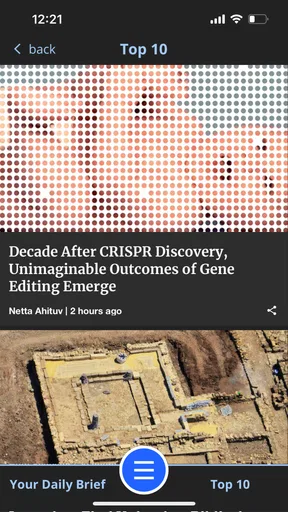
When I first launched the app, I was greeted with a clean and intuitive interface. It's pretty straightforward, which is a refreshing change from some of the cluttered news apps out there. The navigation is smooth, and you can easily jump from one section to another without any hiccups. The app's design feels modern and sleek, making it a pleasure to use.
Coverage and the value of context
Now, let's talk about what really matters - the content. The Haaretz English Edition offers a wide range of news articles that cover everything from politics and culture to economy and technology. The depth of coverage is impressive, with in-depth analyses and opinion pieces that provide a balanced view of the ongoing events. Whether you're interested in local Israeli news or broader Middle Eastern topics, this app has got you covered.
The articles are well-written and engaging, making it easy to get lost in a deep dive about current affairs. And if you're a fan of opinion pieces, you're in for a treat. The app provides a platform for various voices and perspectives, enriching the reader's understanding of complex issues.
One practical way to get more from that mix is to separate reporting from commentary as you read. I would first establish what an article says happened, then use analysis or opinion to consider how the event is being interpreted. That small habit makes it easier to compare arguments without mistaking an individual viewpoint for a straight account of events. It is especially useful when a story is politically charged or developing quickly.
Planning around offline reading and alerts
One of the features I really appreciate is the offline reading mode. It's perfect for those times when you're on the go and don't have internet access. You can easily download articles and read them later, which is a lifesaver during long commutes.
For a reliable offline routine, I would save the pieces I actually intend to finish before leaving a stable connection, rather than assume a page I opened earlier will be available later. A train ride or a wait in a place with weak reception is a natural fit: choose one longer read and perhaps a second article on the same subject, then use the trip to follow the context at a comfortable pace. Offline reading is less helpful if I forget to prepare, so I would make saving articles part of my usual pre-commute check.
The app also sends out push notifications for breaking news, so you never miss out on important updates. However, if you're not a fan of constant alerts, you can customize the settings to suit your preferences. I found this feature particularly handy as it ensures I'm always in the loop without feeling overwhelmed.
I would treat alerts as a prompt to decide whether a story needs attention now, not as a complete news briefing. If frequent interruptions make it harder to concentrate, adjusting notification settings is a sensible first step; you can still open the app when you have time for a proper read. For a calmer routine, I would pair a small number of useful alerts with a deliberate check-in later in the day. That keeps breaking developments visible without turning every update into an obligation.
Mobile reading and finding a story again
Using the app is a breeze. The font is easy on the eyes, and the articles are formatted well for mobile reading. I didn't encounter any bugs or crashes, which is always a plus. The app seems well-optimized for both Android and iOS platforms, ensuring a seamless experience across devices.
There's also a handy search function that lets you find articles on specific topics quickly. Whether you're looking for something you read a while back or exploring new subjects, this feature makes navigation a lot easier.
Search is most useful when I give it a concrete subject rather than a broad request. If I am following a continuing issue, I would search for the central name or topic and use the results to revisit earlier coverage, then read the newer piece with that background in mind. It can also help when I remember a subject but not the article's headline. For a fast scan of everything happening, though, browsing the main sections is more natural than searching one term at a time.
Access, payment, and choosing a routine
While the app is free to download, accessing all the content requires a subscription. It's a bit of a bummer if you're not looking to spend, but considering the quality of journalism, it's worth it. They offer various subscription plans, so you can choose one that best fits your needs. Plus, they occasionally offer promotions, which is a nice touch.
For those who are not keen on subscribing, the app still provides access to some free articles daily, giving you a taste of what it offers. It's a great way to decide if you want to commit to a full subscription.
I would use those free reads to test the actual habit I want, rather than judge the publication from one headline. Try opening the app at the time you normally catch up, reading a mix of a quick report and a longer piece, and checking whether the coverage earns a place in your routine. If I only want an occasional update, paying for broader access may not make sense; if I regularly rely on its regional reporting, a subscription could be easier to justify. The listed purchase range is wide enough that checking exactly what a plan includes matters more than assuming every option works the same way.
Compared with a free, ad-supported headline aggregator, this app makes more sense when depth and a clear editorial home matter more than maximum breadth at no cost. Aggregators can be handy for comparing outlets or scanning many subjects in one place, but they may send me elsewhere to understand the background. A newspaper app gives me a more focused reading experience, while asking me to accept the publication's particular selection of stories and its paid-access boundary. I would keep a general news source alongside it if I needed broad coverage; I would choose this one when I specifically want sustained attention to Israel and the Middle East.
Who will get the most from it
I think it is best for readers who follow the region regularly, are comfortable spending time with analysis as well as straight reporting, and prefer to read in English. It can also suit someone with a personal, academic, or professional interest in Israeli affairs who wants a publication to revisit over time. The most useful routine is not necessarily constant checking: I would open it when I have room to read carefully, save a few relevant articles before travel, and use search to reconnect with a subject that has continued to develop.
I would steer away from it if my priority were a free, all-purpose digest, a tailored stream about hobbies, or only the fastest possible summary of world events. Someone who dislikes subscriptions should also be cautious: the free download and limited free reading offer a way to assess the experience, but they do not remove the access decision. And while English coverage makes the app approachable to readers who do not read Hebrew, the subject focus remains regional rather than universal.
My closing view
All in all, the Haaretz English Edition app is a solid choice for anyone interested in Israeli and Middle Eastern news. Its combination of comprehensive coverage, user-friendly design, and offline capabilities makes it a standout in the sea of news apps.
So, if you're looking to stay updated with reliable and insightful news, give this app a try. It's like having a window into the heart of the Middle East, right from your phone. Happy reading!
What I would keep an eye on
For an existing reader, the practical questions are whether the current version remains comfortable on their device, whether saved reading fits their commute, and whether the access options suit how often they use the publication. The version number offers a useful point of reference, but I would judge future changes by what they do to those everyday tasks: getting to a story, reading it without a connection, and controlling interruptions. Those are the details that would make a release meaningful to me.
My recommendation is to try the free experience with a real reading routine before deciding how much access you need. If the app helps you follow a complex regional story with more care than a feed of headlines, it has a clear role. If you leave it unopened except when a notification appears, or mainly want a broad mix of unrelated news, another option will probably fit better. That is the honest trade-off: a focused newspaper app can reward attention, but it is not a replacement for every kind of news source.
Pros
- High-quality journalism and analysis.
- Intuitive and user-friendly interface.
- Regular updates with breaking news.
- Wide range of topics covered.
- Customizable news alerts.
Cons
- Requires subscription for full access.
- Occasional app performance lags.
- Ads can be intrusive at times.
- Limited offline reading options.
- Some content behind a paywall.
FAQs for Haaretz English Edition
What is Haaretz English Edition and what does it offer?
Haaretz English Edition is a digital platform that provides news and insights from Israel and the Middle East. Users can access in-depth articles, opinion pieces, and breaking news coverage. The app is designed for those who want a comprehensive understanding of regional affairs, politics, culture, and more.
Is a subscription required to access all features of Haaretz English Edition?
Yes, while the app offers some free content, a subscription is required to access the full range of articles and features. Subscriptions provide unlimited access to premium content, including exclusive analysis and editorials. Users can choose from various subscription plans to best suit their reading preferences.
On which platforms is Haaretz English Edition available?
Haaretz English Edition is available on both Android and iOS platforms. Users can download the app from Google Play Store for Android devices and the Apple App Store for iOS devices. This ensures accessibility for a wide range of smartphones and tablets, allowing readers to stay informed on the go.
How user-friendly is the Haaretz English Edition app interface?
The Haaretz English Edition app boasts a user-friendly interface with intuitive navigation, making it easy for users to find articles and topics of interest. The design is clean and modern, enhancing the reading experience. Features like bookmarks and personalized notifications help users customize their news consumption.
Does the app provide content in languages other than English?
The Haaretz English Edition app primarily focuses on providing content in English. However, the original Haaretz website also offers a Hebrew version for native speakers. This allows the app to cater specifically to English-speaking audiences interested in Israeli and Middle Eastern news.


